Statement 2 - Flexible State Machines
A downloadable asset pack
Make a statement with your states!
Statement 2
Flexible state machines for GameMaker
At some point, every game ends up with state logic. You start with a state variable and a switch block. That seems fine...for a while.
Then you need an attack that can't be interrupted. Then a stun that can interrupt it. Then you need to return to whatever the character was doing before the stun. Then an enemy has its own nested behaviour states. Then you need to know why a transition didn't fire.
And suddenly your simple state variable has become a pile of flags, conditionals and special cases that gets harder to change every time you add something new, and constantly seems to break with weird edge cases.
Statement is here to stop that spiral before it starts.
Statement lets you:
- Keep state logic clean with simple Enter, Update, Exit and Draw handlers instead of one enormous switch block, or a buttload of if...else statements.
- Build complicated behaviour safely with transition rules, queues, stacks, nested machines, exit locks, guards, payloads, custom events and more. Statement is simple to use but has a huge amount of depth available to you.
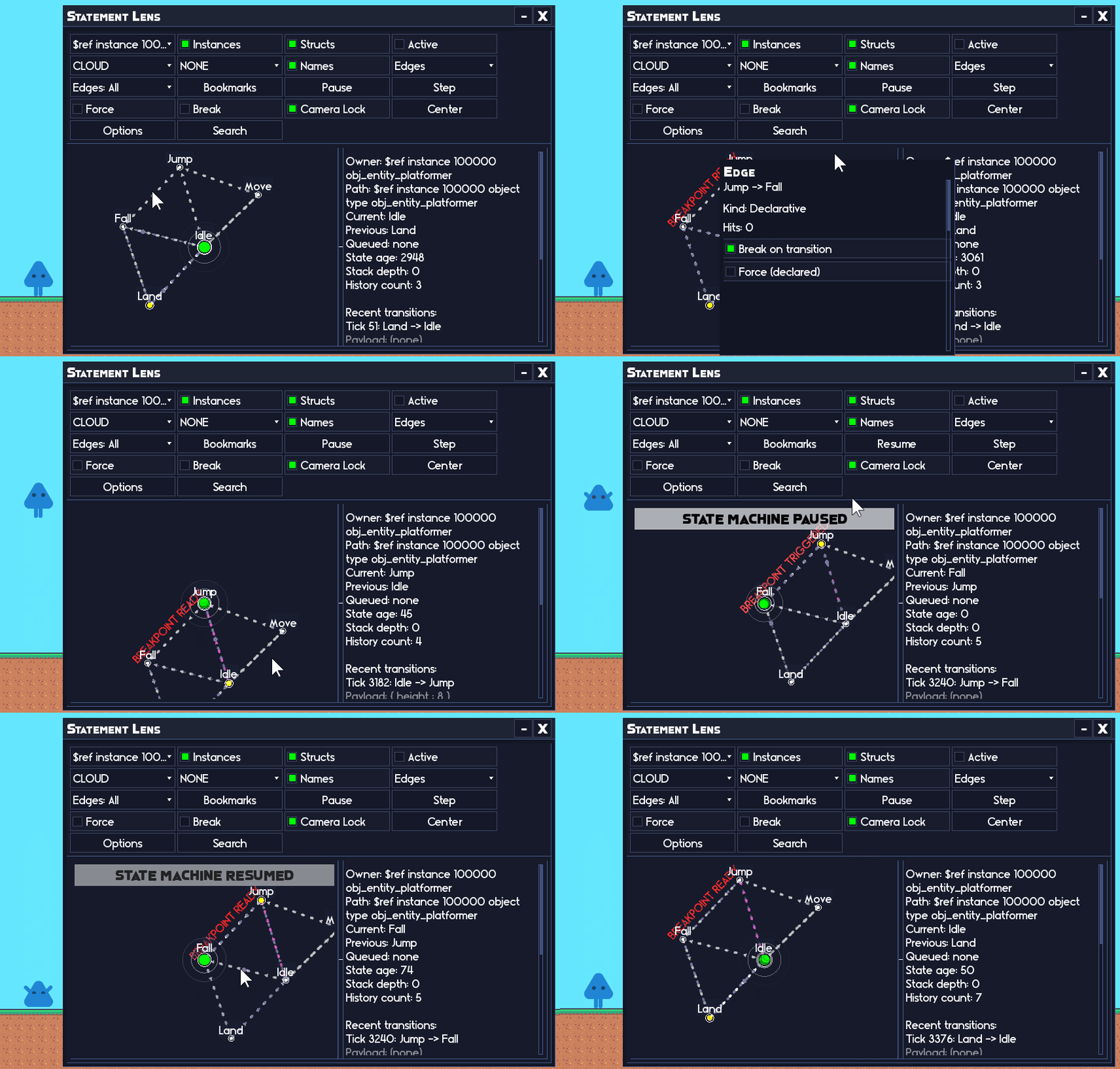
- Actually see what your machine is doing with Statement Lens, a fully interactive visual debugger built directly into Statement.
The basic structure is beginner friendly
// Create Event
state_machine = new Statement(self);
var _idle = new StatementState(self, "Idle")
    .AddEnter(function(_state, _transition) {
        sprite_index = spr_idle;
    })
    .AddUpdate(function(_state) {
        if (keyboard_check(vk_right)) {
            state_machine.ChangeState("Move");
        }
    });
var _move = new StatementState(self, "Move")
    .AddEnter(function(_state, _transition) {
        sprite_index = spr_move;
    })
    .AddUpdate(function(_state) {
        x += 4;
        if (!keyboard_check(vk_right)) {
            state_machine.ChangeState("Idle");
        }
    });
state_machine
    .AddState(_idle)
    .AddState(_move);
// Step Event
state_machine.Update();
That's it at its simplest. Create some named states, give them their own logic, and let Statement handle which one is active. Statement 2 also has extensive documentation to guide you through the process of getting started using it.
For a simple player controller, that alone keeps your code dramatically cleaner. But Statement is also designed for the point where your state machine stops being simple.
Statement Lens: see what your state machine is doing
A state machine is easy to understand when it has three states.
It's considerably less easy when it has fifteen states, multiple conditional transitions, a nested machine, an exit guard, a queued transition and one bug that only happens after the player gets knocked out of an attack at exactly the wrong moment.
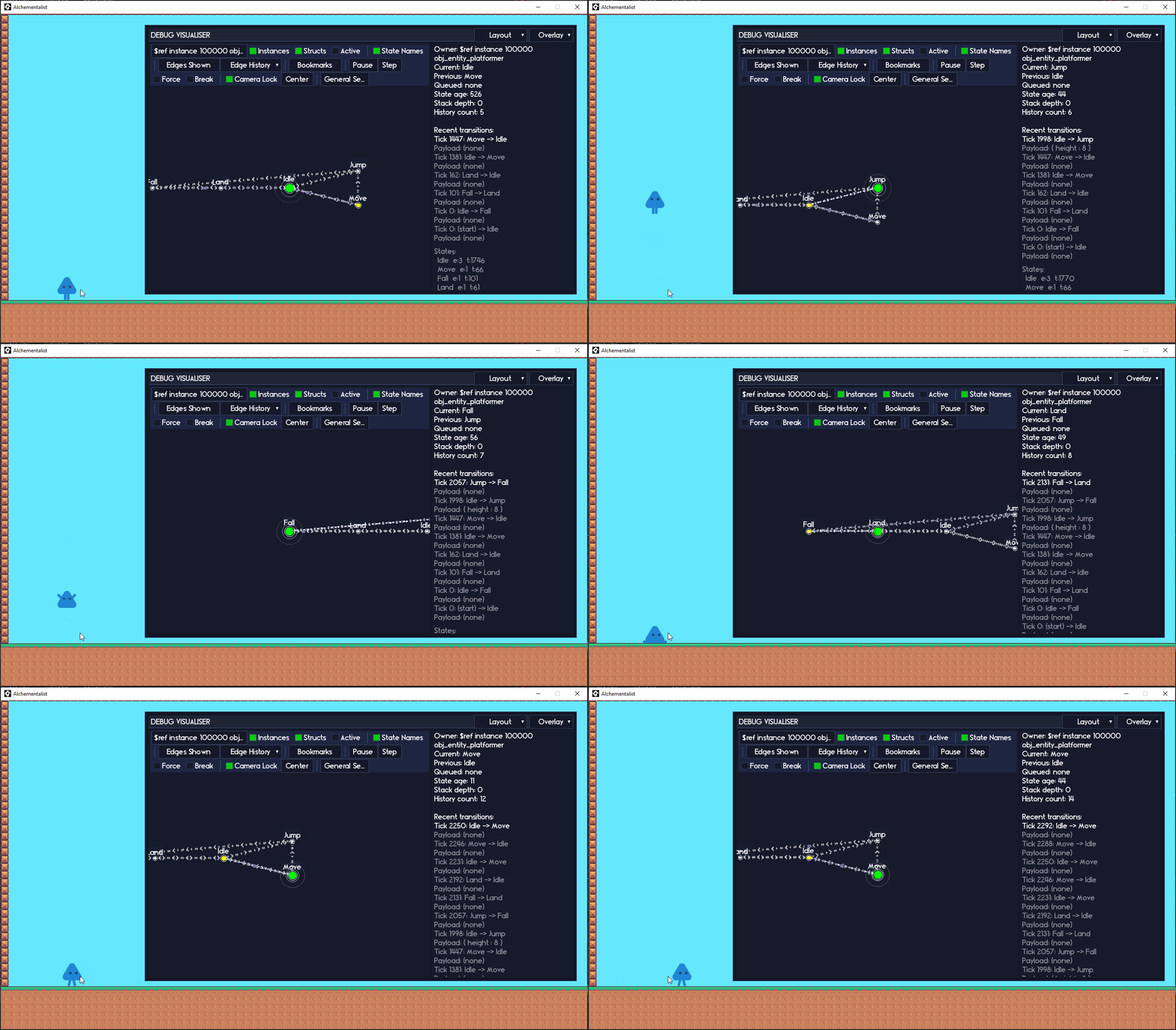
Statement Lens lets you inspect that machine as a live graph while your game is actually running.
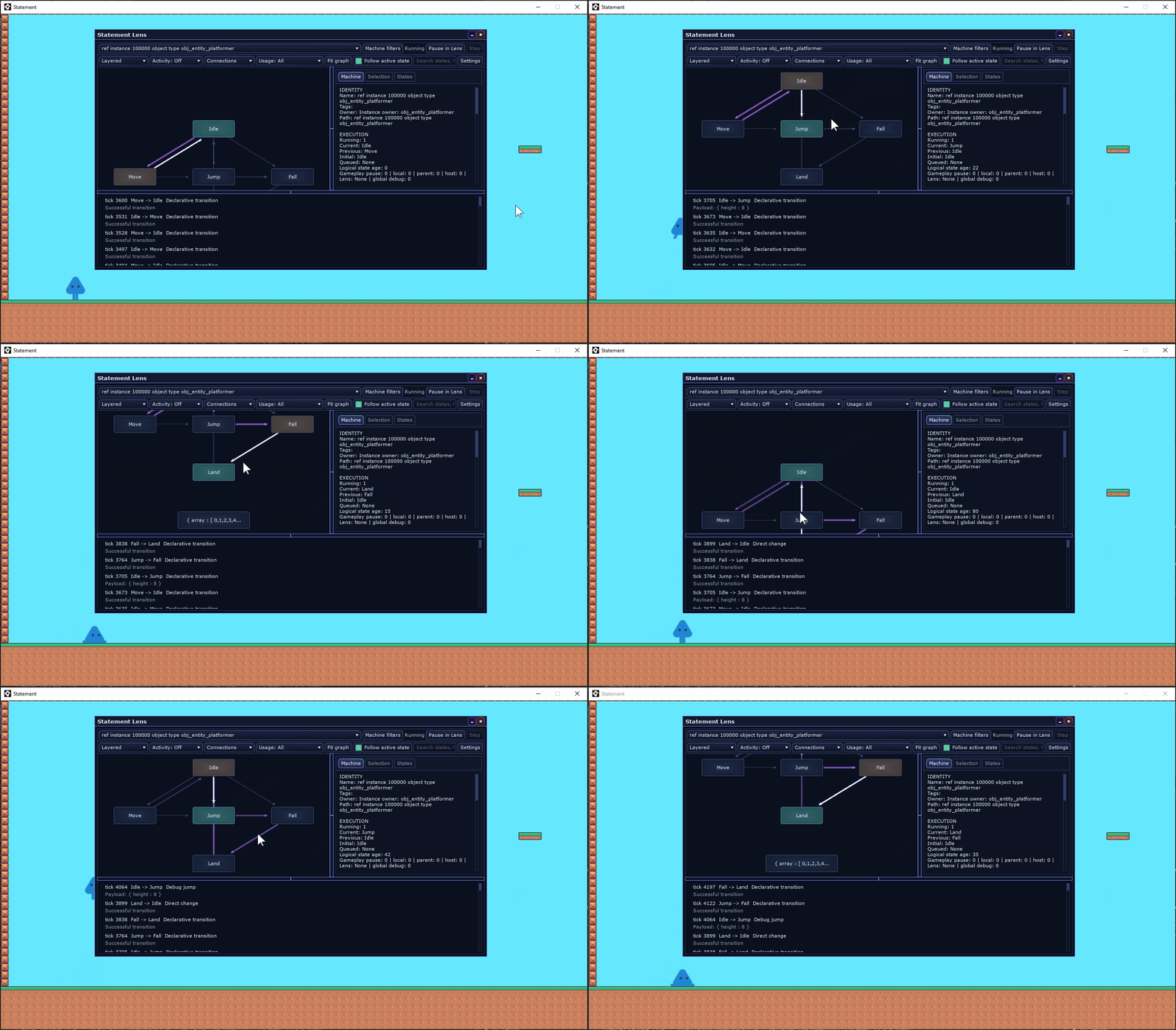
You can see the active state and recent transitions in real time, search through states and machines, inspect transition rules, see why transitions were blocked, inspect queued transitions and examine the activity of the machine over time.
And Lens isn't just a viewer.
You can pause execution, step through the machine one update at a time, set breakpoints on states or transitions, jump directly to another state, clear queues, inspect individual connections and navigate nested machines without rebuilding your game.
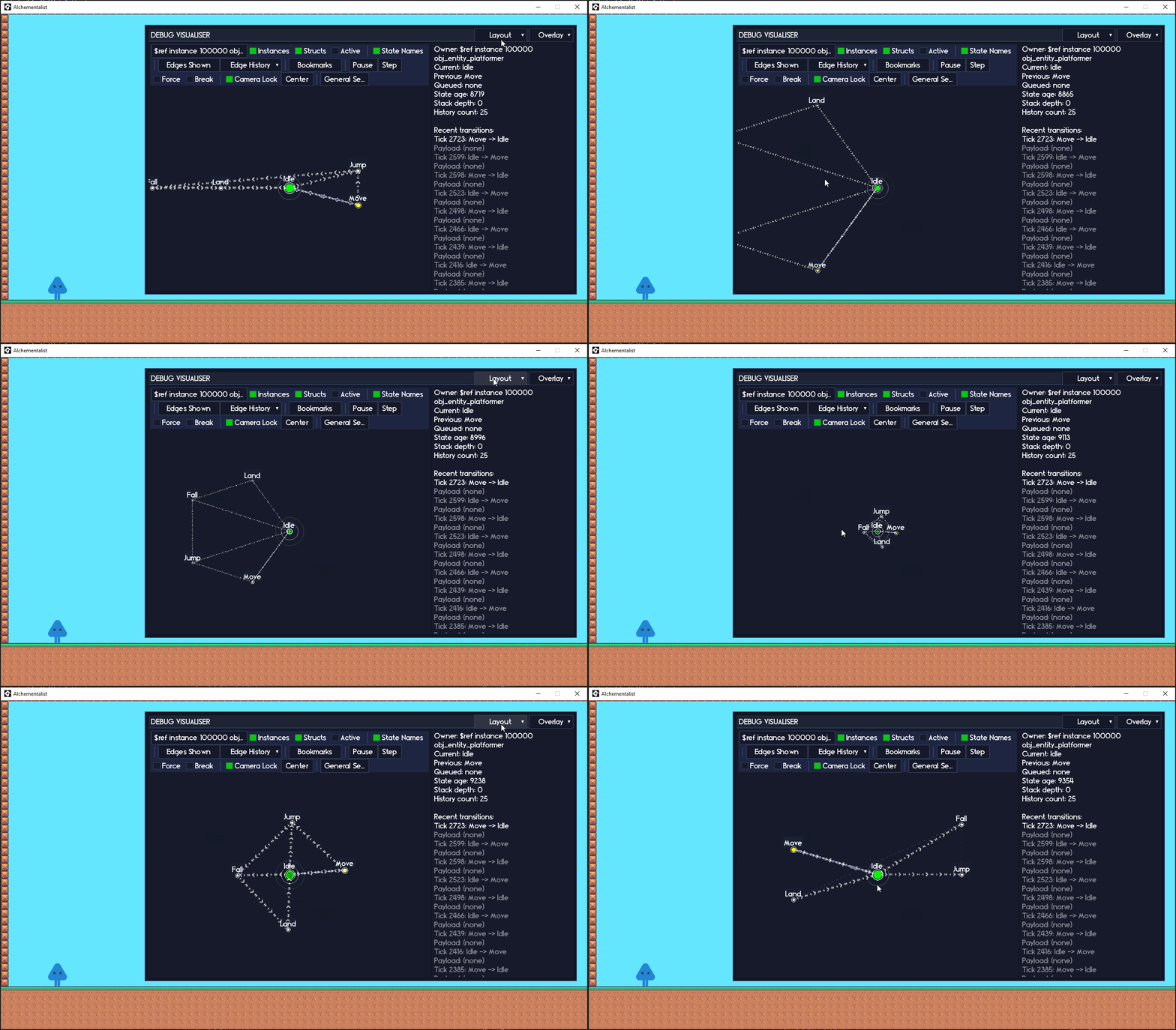
Statement 2 expands Lens substantially with multiple graph layouts, state and connection inspectors, transition traces, rule diagnostics, activity visualisation and saved per-machine views.
When something goes wrong, you can look at what Statement actually did instead of reconstructing it from a wall of debug messages.
Transitions without pain
A lot of state-machine complexity doesn't live inside the states themselves. It lives in everything surrounding the transition from one state to another.
- Should this state exit now? What state should it change to?
- Which of these three possible transitions should win?
- Should this transition happen before the current state updates or afterwards?
- What happens if an states Exit callback decides the machine should go somewhere else?
- What if a queued transition is currently blocked?
- What caused this transition in the first place?
Statement 2 treats transitions as real operations rather than just changing a variable.
Transition Rules let states describe when they should transition instead of filling every Update handler with transition checks. Rules can have priorities, run before or after Update, carry data, be temporarily disabled, or apply across the entire machine...Whatever you want.
_idle.AddTransition(
    new StatementTransitionRule("Move", function(_state, _rule) {
        return keyboard_check(vk_right);
    })
);
Transition Results make every attempted state change inspectable. A transition can tell you whether it succeeded, whether it was blocked, why it was blocked, where it started, where it ended up, what caused it, what data it carried and whether something redirected it along the way.
That means you don't need to be guessing why a state change failed, Statement 2 will literally tell you.
Declarative rules are prioritised and inspectable. Exit restrictions compose cleanly. Transition requests made while another transition is already exiting can redirect that transition safely instead of recursively tearing through state lifecycle code.
For a simple small state machine, you don't have to think about any of this. But when the state machine gets complicated, Statement has your back.
Exit locks and guards
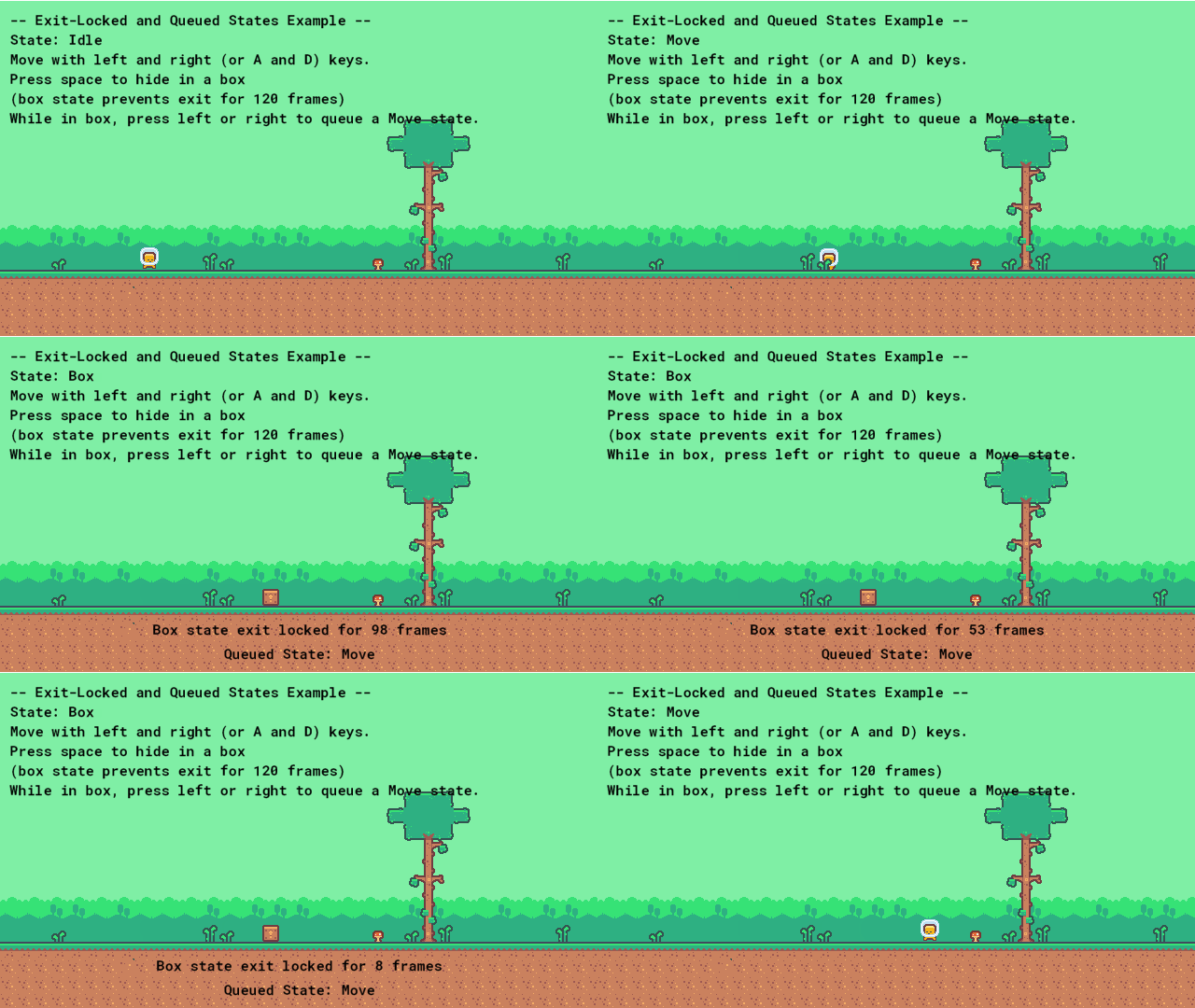
Sometimes a state, quite simply, isn't allowed to exit yet no matter how much the machine begs.
An attack might need to reach its recovery phase before the player can act again. An spellcasting animation might need to finish before the spellcast state can exit. A nested state machine might need to reach a particular state before its parent can change states. A cutscene might need to keep control until some external condition is satisfied.
Statement gives you named exit locks and conditional exit guards, so different systems can independently control whether a state is currently allowed to exit instead of awkwardly fighting over a shared boolean. And when something genuinely needs to override those restrictions (i.e. a death state), forced transitions let you do that explicitly.
Queued transitions and state stacks
Queued transitions let you request a state change without crappily mutating the machine halfway through the code currently running.
Queues can process before Update, after Update, or manually, and blocked queued transitions remain queued until they can actually happen.
State stacks give you PushState() and PopState() for states that need to temporarily take over and then return to whatever was happening before: pause states, cutscenes, knockback, interactions, temporary AI behaviour and more.
Nested state machines
Sometimes one state needs a whole state machine of its own.
An enemy might have high-level states such as Idle, Combat and Dead, while the Combat state contains another state machine handling Approach, Attack, Recover and Retreat.
Statement supports hosted submachines directly, including lifecycle handling, pause behaviour, timing and guards based on the state of the child machine.
That lets you break complicated behaviour into smaller machines instead of eventually creating one enormous graph containing every possible thing an object can do.
Custom events, templates and more
The core of Statement is straightforward and easy to pick up, but there's a lot available under the hood when your project needs it:
- Custom state events let you extend Enter, Update, Exit and Draw with your own events, complete with payloads and hierarchical dispatch through nested machines.
- State templates let you define reusable state behaviour once and build configured copies for different objects.
- Machine lifecycle controls give you explicit Start, Stop and Reset behaviour, so a machine can be completely assembled before any gameplay callbacks run.
- History and introspection lets you inspect what states the machine has cycled through, what it's currently doing and how long states have been active.
- Time scaling is built in, including hierarchical timing for nested state machines.
- Transition hooks let other systems react globally to state exits, transitions and entries without inserting the same code into every state.
- Debug breakpoints and stepping are built into the machine itself and exposed directly through Statement Lens.
Why you need Statement
A basic state machine is very easy to write yourself.
Idle, Move, Attack: put them in a switch and you're done.
The annoying part comes later, as your game grows in complexity and ends up needing interruptions, nested behaviour, temporary states, reusable states, transition priorities, delayed transitions, state history, debugging tools and a bunch of other systems that all want a say in whether the current state is allowed to exit.
That's precisely the part that Statement is built for. Simple to use, hard to break, and handles everything you can throw at it.
You can start with three states and a couple of ChangeState() calls, then keep adding complexity without having to replace any of the initial architecture underneath them.
Want the broader gameplay toolkit?

Statement is also available as part of the Ignition Kit alongside Pulse and Catalyst, with Echo included.

If you want the entire RefresherTowel toolkit collection instead, the Full Suite Pass includes all current and future RefresherTowel Games tools.
Also included: Echo
A purchase of Statement also includes Echo, my GameMaker debugging toolkit, for free.
Echo gives you level-based logging, tags, filtering, optional stack traces, history, file dumps and in-game debugging tools.
Statement Lens is built on Echo's in-game debug UI system, Echo Chamber, which is also included with Statement.
Documentation
Statement has full online documentation written to take you from zero to hero when using Statement. If you're on the fence, I highly recommend having a look through the documentation, as it will help you figure out if you like the library much quicker than any itch sales page can.
Statement Documentation:
https://refreshertowel.github.io/docs/statement/
Requirements
GameMaker 2024.8 or later.
Support and feedback
If you run into a bug, want to request a feature, or just need help figuring out how to build something:
GitHub Issues:
https://github.com/RefresherTowel/Statement/issues
Discord:
Works well alongside Statement

Pulse - signals, events and queries for communication between game systems. Statement can manage what an object is currently doing while Pulse lets the rest of the game react to those changes without tightly coupling everything together.
Catalyst 2 - gameplay statistics, resources and effects. Statement can control behaviour and state while Catalyst handles the values, buffs, resources and temporary effects that influence that behaviour.
Get the broader toolkit
Want Statement 2, Pulse and Catalyst 2 together? Get all three through the Ignition Kit, with Echo included.
Or grab the Full Suite Pass for access to all current and future RefresherTowel Games tools.
Purchase
In order to download this asset pack you must purchase it at or above the minimum price of $5.99 USD. You will get access to the following files:
Development log
- Transition Sweetness (Statement 2 update)2 days ago
- Lens Not Lensing - Statement Update (v1.3.7)Apr 22, 2026
- To Declaratively Transition Or Not To Declaratively Transition - Statement Updat...Mar 10, 2026
- Statement v1.3.5 - Transition data and event handler chainingJan 24, 2026
- Statement v1.3.1 - Minor bugfixJan 18, 2026
- Statement v1.3 - State templates & transition hooksJan 04, 2026
- Statement v1.2 - Statement gives birth to childrenDec 27, 2025
- Statement v1.1 launched! Features Statement Lens: a fully interactable advanced...Dec 10, 2025