
Catalyst (GameMaker Moddable Stats)
Make your stats react!
At some point you decide your game needs modifiable stats. Move speed, attack damage, jump height, whatever. And at first it's fine, you just have a variable and you add to it.
Then you need a buff that lasts five seconds. So you add a timer. Then you need another buff that lasts 10 seconds. So you start to build out a whole timer system. Then you need a debuff that shouldn't stack with another debuff of the same type. So now you have a flag. Then some player asks for a gear comparison screen. And suddenly you're staring at a pile of variables and conditionals that are a buggy, hard to extend, make further development painful rather than fun and limit your ideas to things your half-built system can easily handle. I've been through that enough times that I got fed up and built Catalyst instead.
Catalyst lets you:
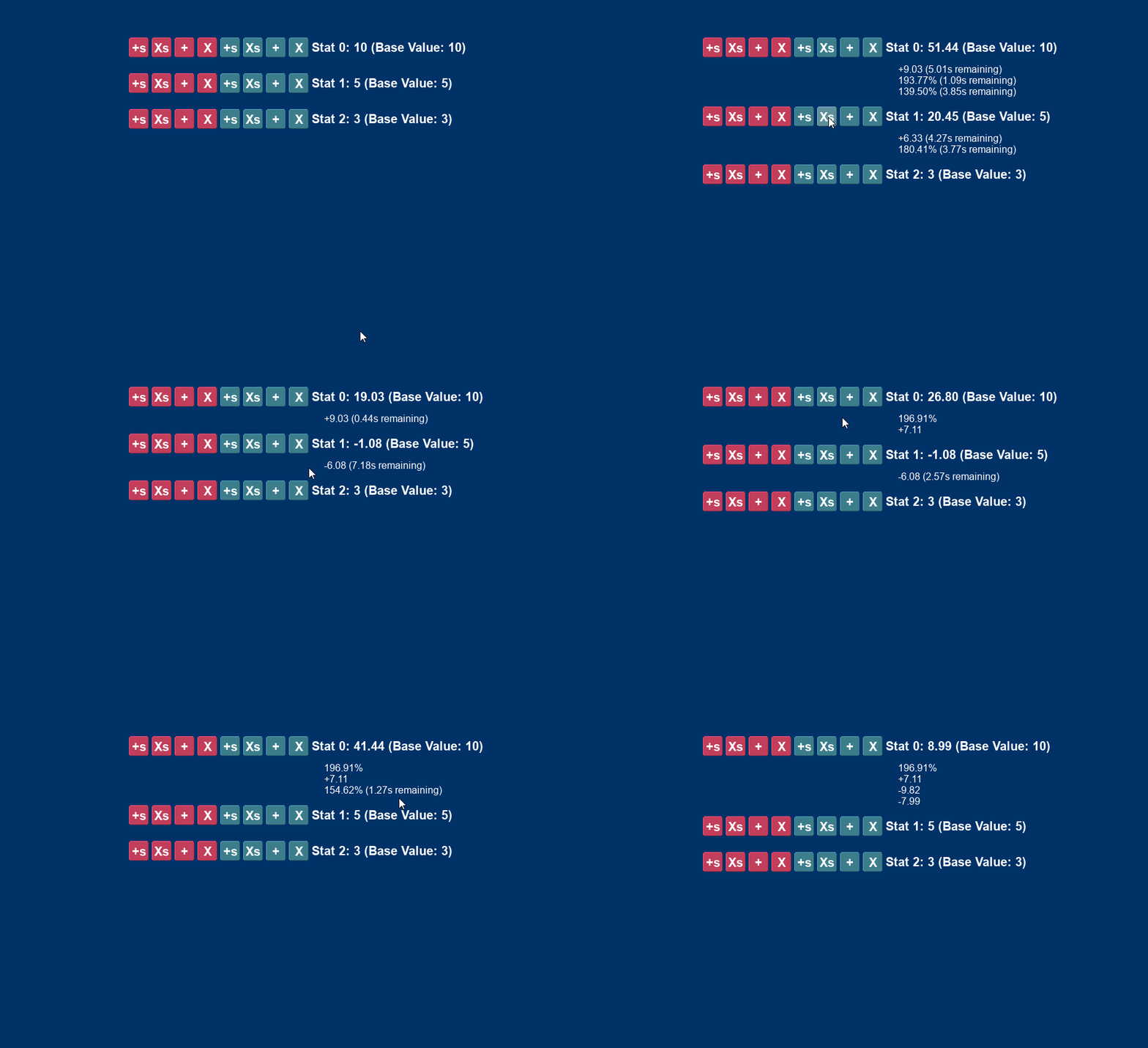
Write clean modifiers with add, multiply, conditional, timed, stacking...all handled with a single line of code easily.
Scale safely with layers, families, derived bases, post-processing, tags for bulk removal, on-change callbacks.
Preview freely, see what a modifier would do before applying it, without touching the stat.
Get the Ignition Kit bundle, featuring Pulse, Catalyst AND Statement for a discount!
Or get the Full Suite Pass bundle to get all current and future tools for one low price (price will increase each time a new tool launches, so get in early for substantial savings!)
A purchase of Catalyst gives you a copy of Echo free!
The core pattern
hp_max = new CatalystStatistic(50).SetName("HP Max");
var _mod = new CatalystModifier(3, eCatMathOps.ADD);
hp_max.AddModifier(_mod);
var _hp_max = hp_max.GetValue(); // 53
That's it at its simplest. Create a stat, attach a modifier, get the value. Catalyst handles the evaluation and returns the correct number. And that alone will save you time. But it's what's underneath that makes it worth using on a real project.
Key features
Catalyst has two math operations: ADD and MULTIPLY. ADD modifiers sum together before MULTIPLY modifiers compound, so two +50% multipliers give you 125% rather than 100% or 225% depending on which mistake you would have made. FORCE_MIN and FORCE_MAX sit at the end of the evaluation pipeline and set hard floors or ceilings after everything else has been applied.
Five built-in evaluation layers (BASE_BONUS, EQUIPMENT, AUGMENTS, TEMP, GLOBAL) control when each modifier runs relative to the others, so base bonuses apply before gear bonuses before buffs without you managing the ordering manually. Timed modifiers pass a duration in ticks and self-remove when they expire, driven by a single CatalystModCountdown() call in your controller step, no per-object timers needed.
The family system lets you group modifiers under a key and pick a stacking mode: HIGHEST applies only the strongest modifier in that family, LOWEST applies only the weakest, STACK_ALL applies them all normally. "Only the best sprint buff counts" or "only the worst slow stacks through" is one line of setup rather than bespoke de-duplication logic every time.
PreviewChange and PreviewChanges evaluate a stat with hypothetical extra modifiers included without mutating anything, so gear comparison screens and talent previews are a single non-destructive call. SetBaseFunc makes a stat's base value a computed formula that recalculates automatically whenever its inputs change. SetPostProcess runs after all modifiers and clamping for anything that needs to happen last, like soft caps or unusual rounding.
Modifiers can be tagged with arbitrary strings, so "remove all debuffs" is one call to RemoveModifiersByTag("debuff"). Source labels and source IDs let you find and remove modifiers by where they came from, which is useful when an ability or item needs to clean up after itself without you holding a reference to every modifier it applied. On-change callbacks fire when the cached value changes and only on context-free calls, so previews don't trigger them by accident. DebugDescribe() logs the full state of a stat and every attached modifier without mutating anything.
Conditional modifiers: making stats react dynamically
Probably the most interesting part of Catalyst is the conditional modifier system. Any modifier can have a condition attached. The condition is evaluated every time the stat's value is requested with a context provided, and the modifier only applies if it returns true. You pass a context struct into GetValue() and the condition reads whatever it needs from that context.
// +50% damage, but only against frozen targets
var _mod = new CatalystModifier(0.5, eCatMathOps.MULTIPLY);
_mod.SetCondition(function(_stat, _ctx) {
    return _ctx[$ "target_is_frozen"];
});
attack_damage.AddModifier(_mod);
"+30% damage to burning enemies", "extra move speed when below 25% health", "bonus armor only while standing still" -- all of these are just one modifier with a condition. No flags, no separate handling, no updating anything when game state changes. You ask for the value with the current context, you get the right answer.
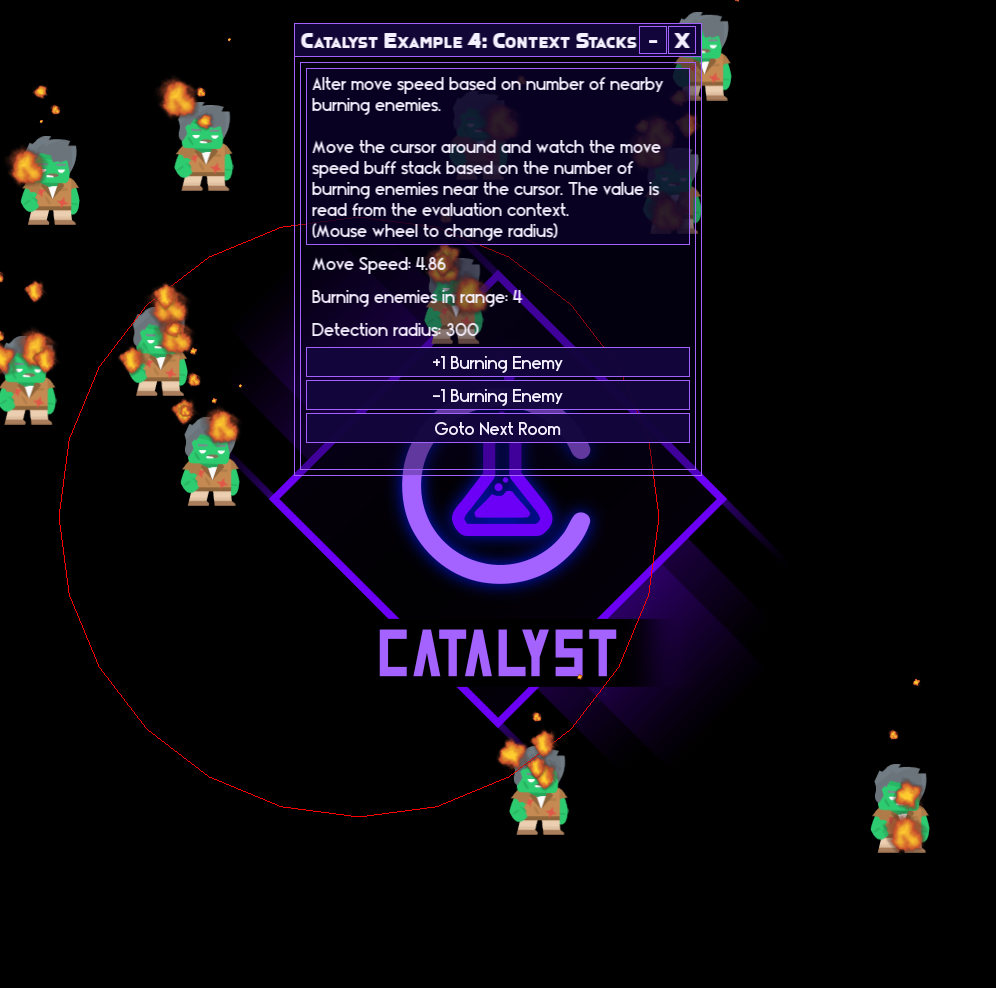
Stack counts can also be driven by context. SetStackFunc computes the effective stack count from the context at evaluation time, so "move speed +5% per burning enemy nearby" is a single modifier that scales automatically with the game state, no counters to maintain.
Why you need Catalyst
Because at some point, every game with any kind of progression ends up needing modifiable stats. You start with a move speed variable and some simple additions. Two weeks later you have if (has_boots && !is_slowed && sprint_timer > 0 && fire_debuff_stacks < 3) scattered across six different objects, and a bug that only happens when the player gets the potion, equips the ring, and then gets hit by the exact enemy type that resets the sprint timer. Catalyst is here to stop that.
Echo debug logger included
Catalyst includes Echo, a lightweight debug logging framework and debug UI builder for GameMaker, entirely for free. Level based logs, tag filters, optional stack traces, rolling history with file dump. You don't need to buy Echo separately if you own Catalyst.
Documentation
Full online documentation including a complete API reference, quickstart guide, and common patterns ready to drop into your project.
Requirements
GameMaker 2.3 or later (structs and methods required).
Echo requires 2024.8+ (uses gpu_set_scissor()).
Support and feedback
If you run into issues or have ideas for improvements:
- GitHub Issues (bugs and feature requests): https://github.com/RefresherTowel/Catalyst/issues
- Discord (questions, discussion, show and tell): https://discord.gg/qx6GtfVWJR
Part of the RefresherTowel Games Toolkits
Part of a growing suite of GameMaker tools designed to play nicely together. If you like this style of tooling, you might also want:
- Whisper - make your narrative dynamic and reactive, like Hades or Crusader Kings III.
- Pulse - a signals and events framework (supporting queries that allow you to ask questions instead of just broadcast signals!)
- Statement - a state machine framework (with a fully visual in-game debugger).
- Quill - a FREE text box creator that automatically gives you advanced features like a right click context menu, proper text selection, multi-line text boxes, plus more!
- Fate - a FREE weighted drop system with an easy to use beginner setup, but with a huge amount of advanced features hiding in the weeds.
- Echo - advanced debug logging (level filtering, tags, optional stack traces, history dumps) that now comes with an advanced, yet easy to use debug UI builder!
Get Pulse, Catalyst, Statement and Echo in the Ignition Kit bundle for a discount! Or buy the Full Suite Pass bundle (get access to all past and future tools) in one go!
Purchase
In order to download this tool you must purchase it at or above the minimum price of $9.99 USD. You will get access to the following files:
Development log
- Making A Delta Of Modifier Time (Catalyst Update v1.1.0)Feb 19, 2026
- Catalyst Full Launch!Jan 08, 2026

Comments
Log in with itch.io to leave a comment.
This looks pretty sweet. Are the modifiers able to stack right out of the box? If I take Binding of Isaac as an example - if you have burning shots and leave a trail of tears after yourself when you move, the trail of tears burn as well. Those combinations are kind of a mess to program and has left me with so much spaghetti code that I could open up an Italian restaurant.
Would this tool be able to assist with that kind of stuff?
Thanks!
Hey, so yeah, Catalyst is designed with the intent of killing spaghetti of a roughly similar kind, but it's not EXACTLY targeted at the kind of trail of tears / burning shots example you've laid out (at least, as far as I understand how that interaction works, I haven't played much binding of isaac). Catalyst specifically deals with stats and modifiers, whereas the example looks like a combination of stats + mods and an effects system. If I were to program it with catalyst, I'd do something like this (this is a very rough pseudo-code toy example which won't work if copy & pasted but should at least give you an idea of the rough shape of the system):
First create an effect (burn in this example), which is where the modifiable catalyst stats live (maybe have a base Effects() constructor that BurnEffects() can inherit from, but I'll leave that out here):
function BurnEffect() constructor {
    chance = new CatalystStatistic(1, 0, 1)
        .SetClamped();
    damage = new CatalystStatistic(3);
    duration = 120;
    apply = function(_context) {
        _context.target.ApplyBurn(
            damage.GetValue(_context),
            duration
        );
    }
}
Then you'd have an effects collection, something like this:
function AttackEffectSet() constructor {
    effects = {};
    static Provide = function(_effect_id, _source, _effect) {
        var _entry = effects[$ _effect_id];
        if (is_undefined(_entry)) {
            _entry = {
                effect    : _effect,
                providers : []
            };
            effects[$ _effect_id] = _entry;
        }
        array_push(_entry.providers, _source);
        return _entry.effect;
    }
    static Resolve = function(_context) {
        var _names = variable_struct_get_names(effects);
        for (var _i = 0; _i < array_length(_names); _i++) {
            var _effect = effects[$ _names[_i]].effect;
            if (random(1) < _effect.chance.GetValue(_context)) {
                _effect.apply(_context);
            }
        }
    }
}
Then you'd have the actual burn being created through the collection constructor:
If you wanted to modify the burn later (maybe a buff or whatever), it'd be something like:
burn.damage.AddModifier(
    new CatalystModifier(2, eCatMathOps.ADD)
        .SetSourceLabel("Hotter Flames")
);
Or:
burn.damage.AddModifier(
    new CatalystModifier(0.5, eCatMathOps.MULTIPLY)
        .SetSourceLabel("Concentrated Tears")
        .SetCondition(function(_stat, _context) {
            return _context.source == eAttackSource.TEAR;
        })
);
And then the tears would resolve the effect when they hit the enemy:
player.attack_effects.Resolve({
    owner  : player,
    target : enemy,
    source : eAttackSource.TEAR
});
And the trail would resolve probably on some per-enemy cooldown based on whether they are still standing on it or not, something like this:
if (CanDamageTarget(_enemy)) {
    DealCreepDamage(_enemy);
    player.attack_effects.Resolve({
        owner  : player,
        target : _enemy,
        source : eAttackSource.TRAIL
    });
    StartTargetHitCooldown(_enemy);
}
And THEN on the enemy side, you'd need some sort of status/tick handler dealing the actual damage:
function BurnStatus(_target, _damage, _duration, _tick_rate) constructor {
    target         = _target;
    damage         = _damage;
    duration       = _duration;
    tick_rate      = _tick_rate;
    time_until_tick = _tick_rate;
    static Update = function() {
        duration--;
        time_until_tick--;
        if (time_until_tick <= 0) {
            target.TakeDamage(damage);
            time_until_tick = tick_rate;
        }
        return duration > 0;
    }
}
Something like that. An effects system like that is much more game-specific than catalyst is trying to be, which is much more targeted towards "I have a number and I want to modify it in various ways" compared to stuff like "I want a burn system applied to an enemy". But catalyst naturally fits into the larger effect/status style system very cleanly and makes altering the burns (like "Hotter Flames" or "Concentrated Tears" example) much easier to manage.
That being said, thinking about this example gave me a few ideas for some extension points to Catalyst that I might add into the library, lol..
Wow, thank you for such an in-depth answer! Your way of coding is quite different from mine, so it's very interesting to see how you'd solve issues like this. I'm just rounding up a small project at the moment, but I'll make sure to purchase this when I jump back to my main game where something like this is desperately needed.