Pulse (GameMaker Signals)
The beating heart of your game.
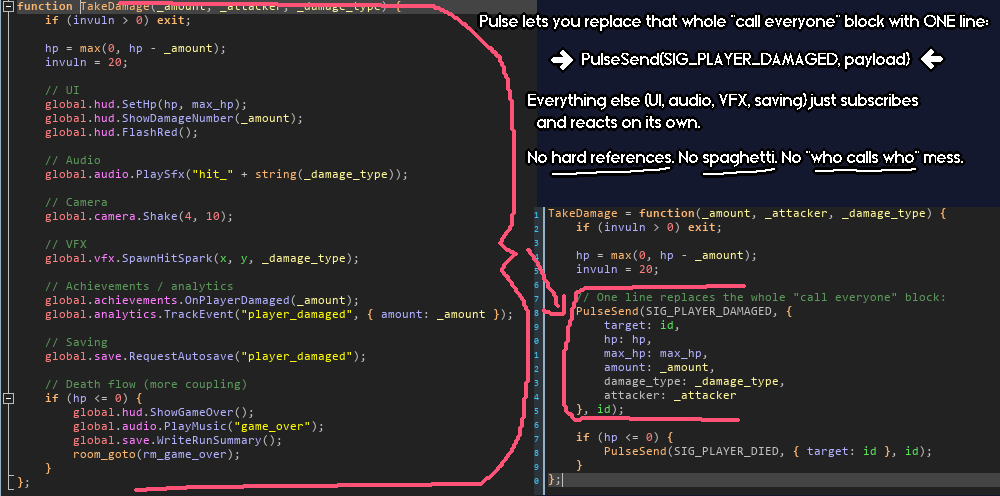
At some point in every GameMaker project, you end up staring at a piece of gameplay code thinking: "ok, when the player takes damage I need to tell the health bar... and the audio manager... and the screen shake... and the save system... and actually wait, does that object even exist yet..."
And then you end up with references going everywhere. Objects that should only care about moving around are suddenly personally responsible for half your game's state. Something changes somewhere and three other things break somewhere else. It's a mess.
Pulse is how you stop doing that.
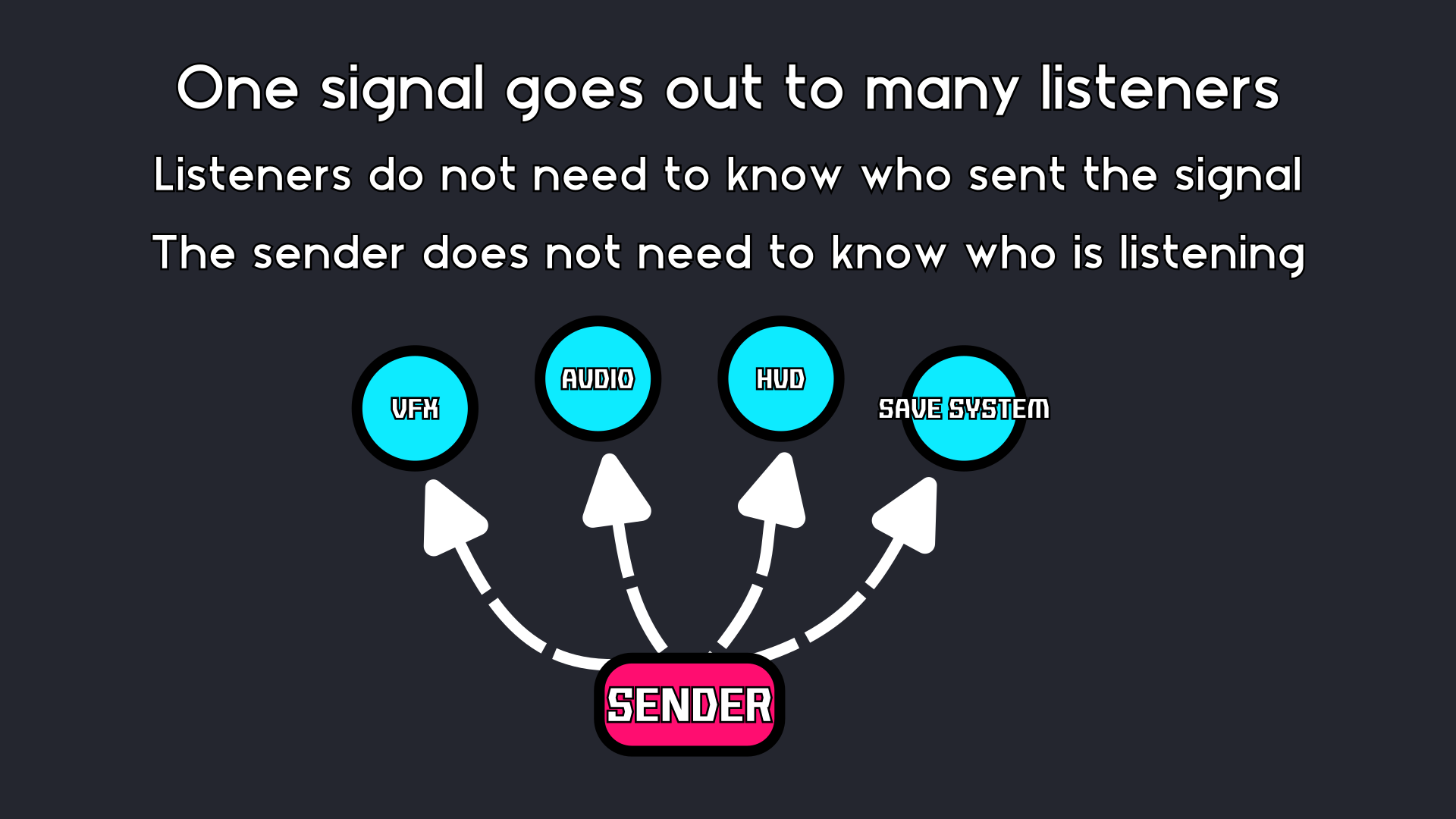
Your game broadcasts what happened. Anything that cares reacts. The sender never needs to know who is listening, or even if anyone is.
Get the Ignition Kit bundle, featuring Pulse, Catalyst AND Statement for a discount!
Or get the Full Suite Pass bundle to get all current and future tools for one low price (price will increase each time a new tool launches, so get in early for substantial savings!)
A purchase of Pulse gives you a copy of Echo free!
Light the fires of Gondor
At its heart, Pulse is two concepts: send a signal, and subscribe to a signal. That's it. You don't need anything else to get enormous value out of it.
So instead of your damage code personally calling the health bar, the audio manager, the VFX system, and whatever else, you do this:
// Somewhere in gameplay code:
PulseSend(SIG_DAMAGE_TAKEN, { amount: 10 }, id);
And then you let everything that cares react on its own:
// In the HUD object:
PulseSubscribe(obj_hud, SIG_DAMAGE_TAKEN, function(_data) {
    hp_bar_target -= _data.amount;
});
// In the audio manager:
PulseSubscribe(obj_audio, SIG_DAMAGE_TAKEN, function(_data) {
    audio_play_sound(snd_hit, 0, false);
});
// In the VFX manager:
PulseSubscribe(obj_vfx, SIG_DAMAGE_TAKEN, function(_data) {
    fx_screen_shake(4);
});
Same event. Three listeners with absolutely no hard references between any of them. Add a fourth listener later and you don't touch the sender at all. Remove one and nothing else notices. This is what it feels like when your code is robust instead of being built out of toothpicks and gum.
The part where your project gets bigger
Simple broadcast and listen will take you a long way. But bigger projects have bigger problems, and Pulse has a lot of escape hatches for when you hit them.
Consumable signals
Sometimes you want one listener to handle an event and stop the rest from running. Any listener can do this, either by returning true from its callback, or by setting consumed = true on a struct payload. Useful for input handling, layered UI systems, anything where "I got this, everyone else stand down" is the correct behavior.
Sender filters
Subscribe to a signal from a specific sender rather than from any sender. Listen to damage events from the boss but ignore the same signal from everything else. Pass the optional from parameter when subscribing and Pulse handles the rest.
Priority ordering
Listeners run in descending priority order. Higher priority runs first. If priorities are equal, first subscriber runs first. Set priority via the listener builder API when you need something to always run before everything else on a given signal.
One-shot listeners
PulseSubscribeOnce subscribes a listener that automatically removes itself after the first matching event. Subscribe to the first level-up, the first time a door opens, whatever. No manual cleanup needed.
Sticky signals
PulseSendSticky works like a normal send but stores the payload. Any listener that subscribes after the signal was sent, and opts in with .Sticky(true), receives that last payload immediately on subscribe. Handy for things like "what's the current game state" where a late subscriber shouldn't have to wait for the next update to get caught up.
Subscription groups
PulseGroup() lets you bundle a pile of subscriptions together, then unsubscribe all of them in a single call. Bind everything for a UI panel, a room, a game state, clean up all of it at once when you're done. Groups also support shared defaults (like a shared priority or tag) across everything they manage, and you can enable and disable the whole group at once.
Asking questions instead of just shouting events
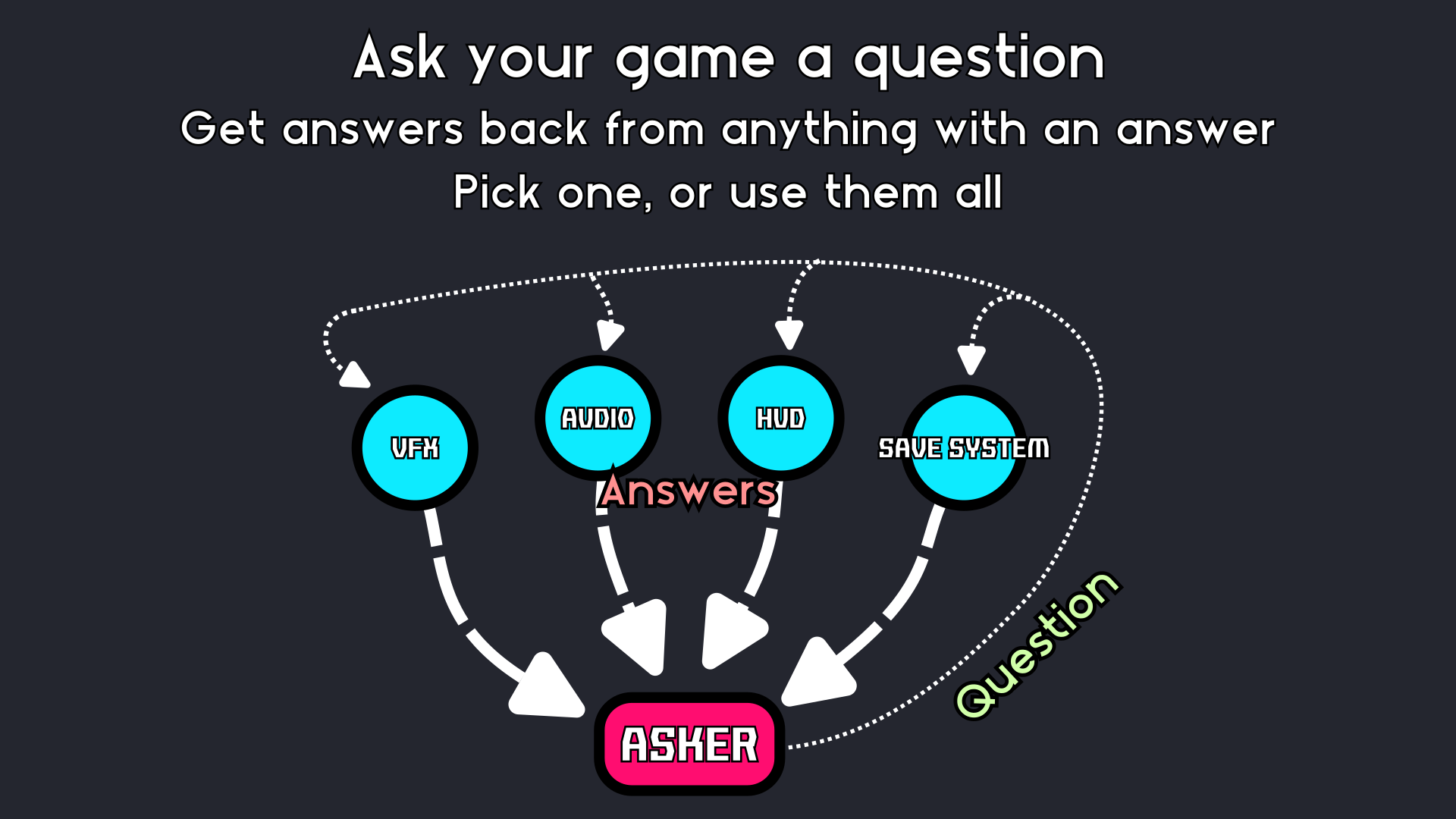
Sometimes you don't want to broadcast "something happened." Sometimes you want to ask "ok, who knows the answer to this?" That's what queries are for, and it's one of my favorite things about Pulse.
// Ask every registered vendor what they're offering for this item:
var offers = PulseQueryAll(SIG_GET_OFFERS, { item_id: item_id });
// Ask the AI system to pick a target, fall back to player if nothing responds:
var target = PulseQueryFirst(SIG_AI_PICK_TARGET, undefined, noone, player_id);
Listeners that want to participate respond via a context struct instead of just running a side effect:
PulseSubscribe(obj_vendor, SIG_GET_OFFERS, function(_ctx) {
    if (can_afford(_ctx.payload.item_id)) {
        _ctx.Add({ price: my_price, vendor: id });
    }
});
PulseQuery gives you a full collector struct with Count(), ToArray(), First(), and Single(). PulseQueryAll just hands you the array directly. PulseQueryFirst gets the highest-priority response and returns a default if nobody answered. So instead of inventing a new bespoke "who handles this" manager every time you need one, you just send a query.
When timing matters
PulsePost queues a signal for deferred processing instead of firing it immediately. Call PulseFlushQueue in your controller's Step event and everything processes in FIFO order. Useful for avoiding mid-step weirdness, or when you want finer control over when things actually run.
There are a few variations worth knowing about. PulsePostLatest keeps only the latest queued payload per (signal, sender) pair, so if you're queueing camera or cursor position updates every frame, you're not building up a stack of outdated events to process. And PulsePostAfterFrames defers a signal by a number of flush frames, returns a cancellable handle, so you can fire something two frames from now and change your mind before it goes.
You can also set a frame event budget and queue size limits, with configurable overflow policies (drop newest or drop oldest) when the queue fills up. Probably overkill for most projects, but it's there when you need it.
The listener builder (when you need easily tweakableknobs)
When you need to set multiple options on a subscription at once, the listener builder API is cleaner than stacking parameters:
PulseListener(id, SIG_DAMAGE_TAKEN, OnDamage)
    .From(boss_id)
    .Priority(10)
    .Tag(TAG_COMBAT)
    .Once()
    .Subscribe();
Chain whatever you need, call .Subscribe() at the end. You get back a handle with an Unsubscribe() method, metadata about the subscription, and an ePulseResult telling you whether it actually worked. You can also .Enable() and .Disable() subscriptions individually via the handle without removing them, which is useful for things like pausing input listeners during cutscenes.
Multiple buses (keeping things cleanly separated)
By default everything runs on one global bus, which is fine for most projects. If you need strict isolation between, say, gameplay events, UI events, and debug tooling, you can create independent PulseController instances with PulseBusCreate(). Each bus has its own listeners, its own queue, its own everything. The full API is mirrored on each controller, so you're not giving anything up.
Phase lanes are another optional tool here. You can register named priority bands (GAMEPLAY, UI, DEBUG or whatever you want) with base priorities, and then set per-listener offsets within each band. Keeps priority numbers from becoming a mess as your project grows.
It also tries hard not to blow up on you!
Pulse uses weak references for struct and instance subscribers. If an instance is destroyed and you forgot to unsubscribe it, Pulse will prune it the next time that signal dispatches. You should still call PulseRemove(id) in Destroy events (it's a good habit and keeps things predictable), but Pulse isn't going to crash because you forgot once.
If a listener throws an error during dispatch, Pulse logs it and continues with the next listener. It also emits a PULSE_ON_ERROR signal with the full error details, so you can subscribe to it for debugging or tooling without it taking down your whole dispatch chain.
All the dispatch functions return ePulseResult enums so you can tell exactly what happened. SGL_SENT means at least one listener ran. SGL_NOT_SENT_NO_LST means the signal exists but nobody is listening. SGL_DEFERRED_REENTRY means Pulse hit a re-entrant send and queued it safely for later. You can check these or ignore them, but they're there.
Debugging (when the signals get hard to follow)
PulseDump() logs every registered signal and its listeners. PulseDumpSignal(SIG_DAMAGE_TAKEN) narrows it to one signal. PulseCount(signal) and PulseCountFor(id) give you listener counts. All the output goes through Echo if you have it (which you get free with a Pulse purchase, so you probably do).
For harder debugging problems there's the trace recorder. PulseTraceStart() starts recording every signal event into a ring buffer. PulseTraceDump() outputs the full history. You can filter by event kind, set the buffer size, and stop/start recording whenever. It's the kind of thing you turn on when you can't figure out why a signal fired when it shouldn't have (or didn't fire when it should have).
You can also register metadata on signals with PulseSignalMeta, giving them friendly names and category labels that show up in dumps and debug tooling. Small thing but genuinely useful when you have forty signals and the dump is just a wall of enum integers.
Documentation
Full online documentation including a complete API reference, common patterns, and a quickstart guide.
Requirements
GameMaker 2.3 or later (structs and methods required).
Echo requires 2024.8+ (uses gpu_set_scissor()).
Support and feedback
If you run into issues or have ideas for improvements:
- GitHub Issues (bugs and feature requests): https://github.com/RefresherTowel/Pulse/issues
- Discord (questions, discussion, show and tell): https://discord.gg/acAqBcYHgV
Part of the RefresherTowel Games Toolkits
Part of a growing suite of GameMaker tools designed to play nicely together. If you like this style of tooling, you might also want:
- Whisper - make your narrative dynamic and reactive, like Hades or Crusader Kings III.
- Catalyst - makes modifiable statistics (and general numbers) super easy.
- Statement - a state machine framework (with a fully visual in-game debugger).
- Quill - a FREE text box creator that automatically gives you advanced features like a right click context menu, proper text selection, multi-line text boxes, plus more!
- Fate - a FREE weighted drop system with an easy to use beginner setup, but with a huge amount of advanced features hiding in the weeds.
- Echo - advanced debug logging (level filtering, tags, optional stack traces, history dumps) that now comes with an advanced, yet easy to use debug UI builder!
Get Pulse, Catalyst, Statement and Echo in the Ignition Kit bundle for a discount! Or buy the Full Suite Pass bundle (get access to all past and future tools) in one go!
Purchase
In order to download this tool you must purchase it at or above the minimum price of $7.99 USD. You will get access to the following files:
Development log
- Later My Guy (Pulse Update v2.0.0)Feb 19, 2026
- Pulse v1.2.0 - Getting StickyJan 11, 2026
- Pulse v1.1.1 - Hotfix to Echo accompanimentDec 30, 2025
- Pulse v1.1 - The references have been weakened!Dec 27, 2025
- Pulse has launched!Dec 18, 2025