
Quill (Free GameMaker Text Boxes)
A downloadable tool
<title>Quill Landing Page</title>
At some point your game needs the player to type something. A character name. A save file name. A search box. A notes field. An in-game console. Whatever it is, you sit down to implement it and you immediately remember: text input in GameMaker is a pain in the arse.
keyboard_string gives you a string that grows but doesn't shrink properly. Caret positioning is manual. Text selection is manual. Clipboard is manual. Backspace, delete, home, end, ctrl+A, ctrl+C, ctrl+V — all of it manual. And that's before you even think about placeholder text, labels, validation messages, or a right-click context menu. By the time you have something that behaves like a normal text box, you've written several hundred lines of code that have nothing to do with your actual game.
Quill handles all of that. For free.
Textboxes in three lines of code
Create a text box in your Create event:
textbox = QuillSingle("Character Name", "Enter your name...");
Draw it in your Draw GUI event:
textbox.Draw(x, y);
textbox.DrawOverlay();
That's it. You now have a text box with a label, placeholder text, mouse click to position caret, click-drag to select, double-click to select word, triple-click to select all, Ctrl+A, Ctrl+C, Ctrl+X, Ctrl+V, Ctrl+Z, Ctrl+Y, Home, End, Shift+arrow key selection, and a right-click context menu with Cut/Copy/Paste/Select All. All of that, three lines.
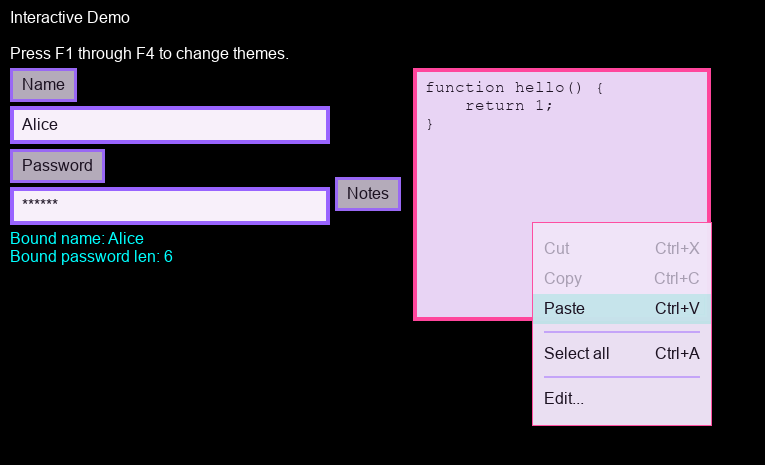
Multiline compatible
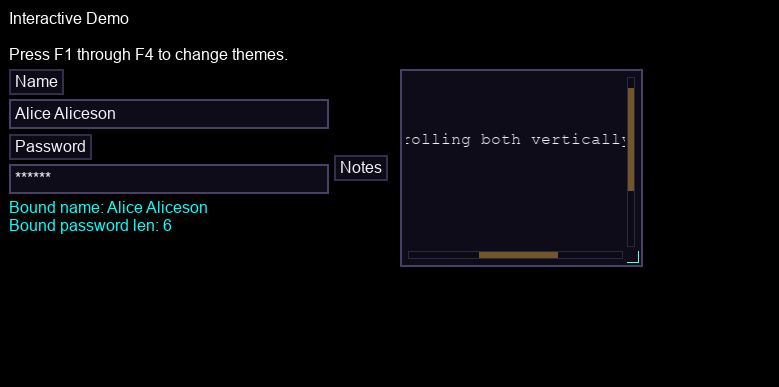
Swap QuillSingle for QuillMulti and you get a multiline text area instead. Word wrap, scrolling, resizable via a drag grip, auto-indent, Tab-inserts-spaces if you want it. There's also an overlay editor mode for when you want a small inline box that opens into a proper full editor when the user clicks into it — useful for things like notes fields in a game UI where you don't have a lot of room.
notes = QuillMulti("Notes", "Write something...")
    .SetWrap(true)
    .SetResizable(true)
    .SetVisibleRows(4);
All the setters chain, so you can configure a box in one expression and move on.
Input modes (filtering the text)
Quill has built-in input modes for when you need something more specific than plain text. QUILL_TEXTMODE_INT and QUILL_TEXTMODE_FLOAT restrict input to numbers (with optional negative and decimal support). QUILL_TEXTMODE_IDENTIFIER locks to valid identifier characters. QUILL_TEXTMODE_PATH handles file path input. QUILL_TEXTMODE_PASSWORD masks the text, with a configurable mask character and an option to allow or deny clipboard copy.
// Integer only, no negatives
speed_input = QuillSingle("Move Speed", "0")
    .SetInputMode(QUILL_TEXTMODE_INT);
// Password, using underscore as the mask character
password_box = QuillSingle("Password", "")
    .SetPasswordMask(true, "_");
There's also QUILL_TEXTMODE_CODE which uses a monospace font automatically and pairs with the tab/indent settings, if you're building something that needs a code editor field. And if none of the built-in modes fit, SetFilterFn lets you provide your own function to transform or reject input on the way in, and SetAllowedChars / SetDeniedChars handle simpler allow/block lists without a full custom function.
Validation
When the player types something wrong, you probably want to tell them. Quill has a validation message system built in — show an error (or warning, or info) message attached to the text box, and clear it when the input is valid again.
username_box.OnSubmit(function(_tb, _value) {
    if (string_length(_value) < 3) {
        _tb.SetValidationMessage("Name must be at least 3 characters.", "error");
    } else {
        _tb.ClearValidationMessage();
        save_character_name(_value);
    }
});
Callbacks
Five callbacks covering the events you actually care about: OnChange, OnFocus, OnBlur, OnSubmit, and OnCancel. There's also SetOnLiveChange with an optional rate limiter in milliseconds, for when you want to react to keystrokes without firing on every single one (useful for search boxes or live filtering).
BindText goes one step further — bind the textbox directly to a field on a struct and Quill keeps it in sync automatically without you writing an OnChange handler at all.
player_name_box.BindText(save_data, "player_name");
Tab order and focus
When you have a form with multiple text boxes, Tab should cycle through them in a sensible order. SetTabOrder assigns a position in the cycle, and Quill handles the rest. Focus() and Blur() let you move focus programmatically, and SetSelectAllOnFocus auto-selects the contents when a box becomes active, which is usually what you want for things like score entry or settings fields.
Custom context menus
The right-click context menu comes with Cut/Copy/Paste/Select All by default. You can add your own items on top of that, either globally (so they appear in every Quill textbox) or per-textbox. Separators, click callbacks, keyboard shortcut labels, enable/disable state — the full thing.
username_box.ContextMenuAddItem(
    QuillContextMenuItem("Generate Random Name", function() {
        username_box.SetValue(generate_random_name());
    }, "random_name")
);
Theming
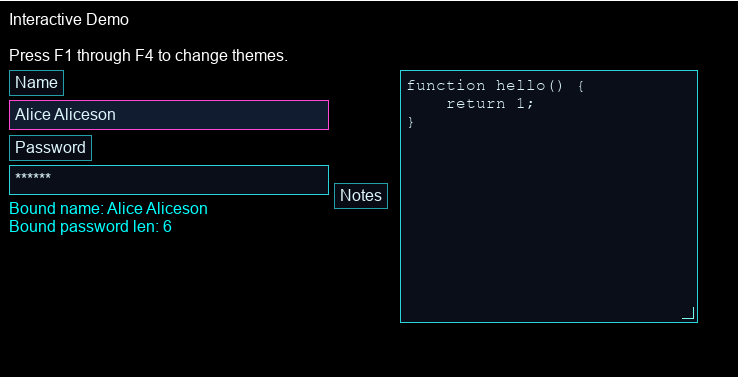
Quill has a full theme system. Two built-in presets (QuillTheme_VoidMango and QuillTheme_ChunkyCandy) to get you started, or build your own with QuillTheme and its subtheme constructors. Covers fonts, textbox appearance, label styles, selection highlight, caret, scrollbar, context menu, and the overlay editor. Both primitive-drawn and 9-slice sprite options are supported throughout, so you can make it match your game's existing art style rather than fighting against a hardcoded look.
Set a global theme for everything, or override it per-box when one needs to look different from the rest.
Documentation
Full documentation including a getting started guide, usage examples, theming guide, and the complete API reference.
Support and feedback
Discord (questions, discussion, show and tell): https://discord.gg/QJQ4cRHPx9
Part of the RefresherTowel Games Toolkits
Part of a growing suite of GameMaker tools designed to play nicely together. If you like this style of tooling, you might also want:
- Whisper - make your narrative dynamic and reactive, like Hades or Crusader Kings III.
- Catalyst - makes modifiable statistics (and general numbers) super easy.
- Pulse - a signals and events framework (supporting queries that allow you to ask questions instead of just broadcast signals!)
- Statement - a state machine framework (with a fully visual in-game debugger).
- Fate - a FREE weighted drop system with an easy to use beginner setup, but with a huge amount of advanced features hiding in the weeds.
- Echo - advanced debug logging (level filtering, tags, optional stack traces, history dumps) that now comes with an advanced, yet easy to use debug UI builder!
Get Pulse, Catalyst, Statement and Echo in the Ignition Kit bundle for a discount! Or buy the Full Suite Pass bundle (get access to all past and future tools) in one go!
Download
Click download now to get access to the following files:
Development log
- Pixel Sprite (Quill hotfix v1.0.3)36 days ago
- Aligning Expectations (Quill Hotfix v1.0.2)38 days ago
- When a line doesn't scroll - Quill Update v1.0.146 days ago
- Making text input super easy for GM FREE - The launch of Quill!46 days ago

Leave a comment
Log in with itch.io to leave a comment.